Why Your Google Ads Aren't Getting Conversions (And How to Fix It)
Why your Google Ads aren't converting

When a business owner tells me their Google Ads aren't converting, I usually know what I'll find before I open the account. In most cases the money is going to one of three places: clicks on searches that have nothing to do with the business, conversion tracking that counts the wrong things, or a budget too small to reach the people who are ready to buy.
The landing page gets blamed a lot. So does the sales team. Both can be part of the problem, but I always want the account cleaned up first, because fixing these three things often turns results around without changing anything on the website.
Below I'll go through each cause, show you how we fixed all three for a pest control client whose cost per lead dropped from $700 to $100, explain where I disagree with Google's own advice, and give you a 30 minute check you can run on your own account.
The three most common reasons Google Ads don't convert
1. You're paying for irrelevant search terms
Your keywords decide which searches can trigger your ads. The search terms report shows what people typed before they clicked, and those searches are what you pay for. When that report is full of irrelevant searches, your budget is going to people who were never going to become customers.
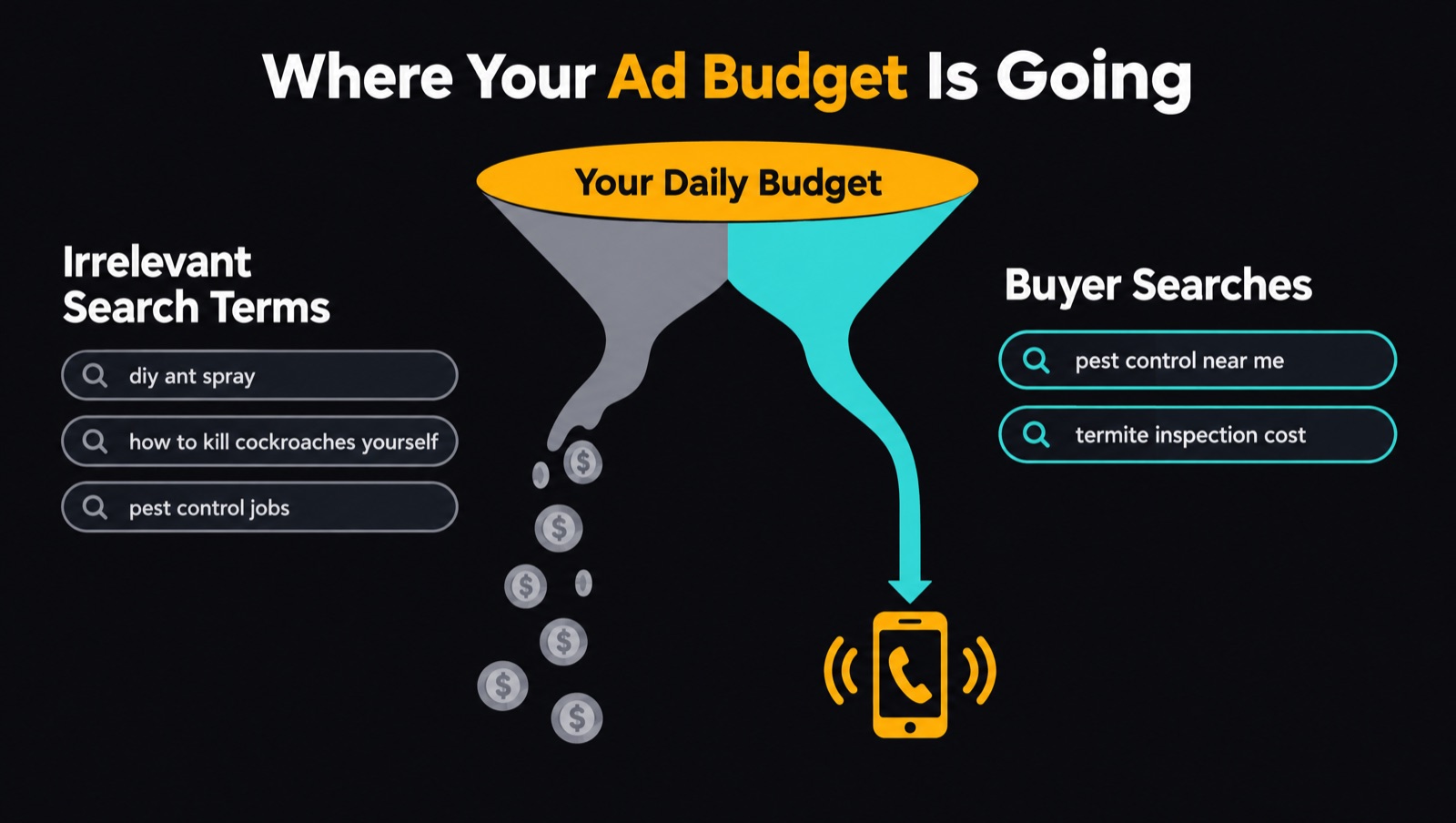
This usually comes down to two things:
- Loose match types. Broad match keywords, or phrase match keywords that were set up poorly, let Google show your ad on searches that are only loosely related to what you sell. If you're not sure how the match types differ, our guide to broad match vs exact match explains when each one makes sense.
- No search term auditing. Even a well built account picks up junk searches over time. If nobody is checking and adding negative keywords, that junk keeps costing you money every day.
We audit search terms every week at a minimum. Weekly is the least I'd recommend for any account spending money it cares about.
2. Your conversion tracking is counting the wrong things
Smart bidding learns from whatever you tell it a conversion is. If your tracking counts button clicks, form starts or contact page loads as conversions, Google learns that a page load means success. It then starts bidding more on the searches and keywords that lead to page loads, whether or not those people ever became customers.
The result is an account that looks great in the Google Ads dashboard while the phone stays quiet. Google reports plenty of conversions, the algorithm keeps steering budget toward the wrong people, and nobody can see why, because the numbers say everything is working.
3. You're underbidding for the buyers you want
This is the one most business owners and plenty of agencies miss. If your daily budget gets you fewer than 7 to 10 clicks a day, you're likely significantly under budgeted. A small budget means you can only afford the cheapest clicks, and the cheapest clicks are usually the people Google thinks are least likely to buy.
Here's how that works. Say two people are looking for a plumber, and Google knows that people in this market tend to book on their third search.
- Person A is on their third search for "plumbing service near me".
- Person B is on their first search for "plumbing service near me".
They typed the exact same search, but Google knows Person A is much more likely to book, so Google makes Person A more expensive. It doesn't tell you it's doing this. With a low budget, you can only afford Person B.
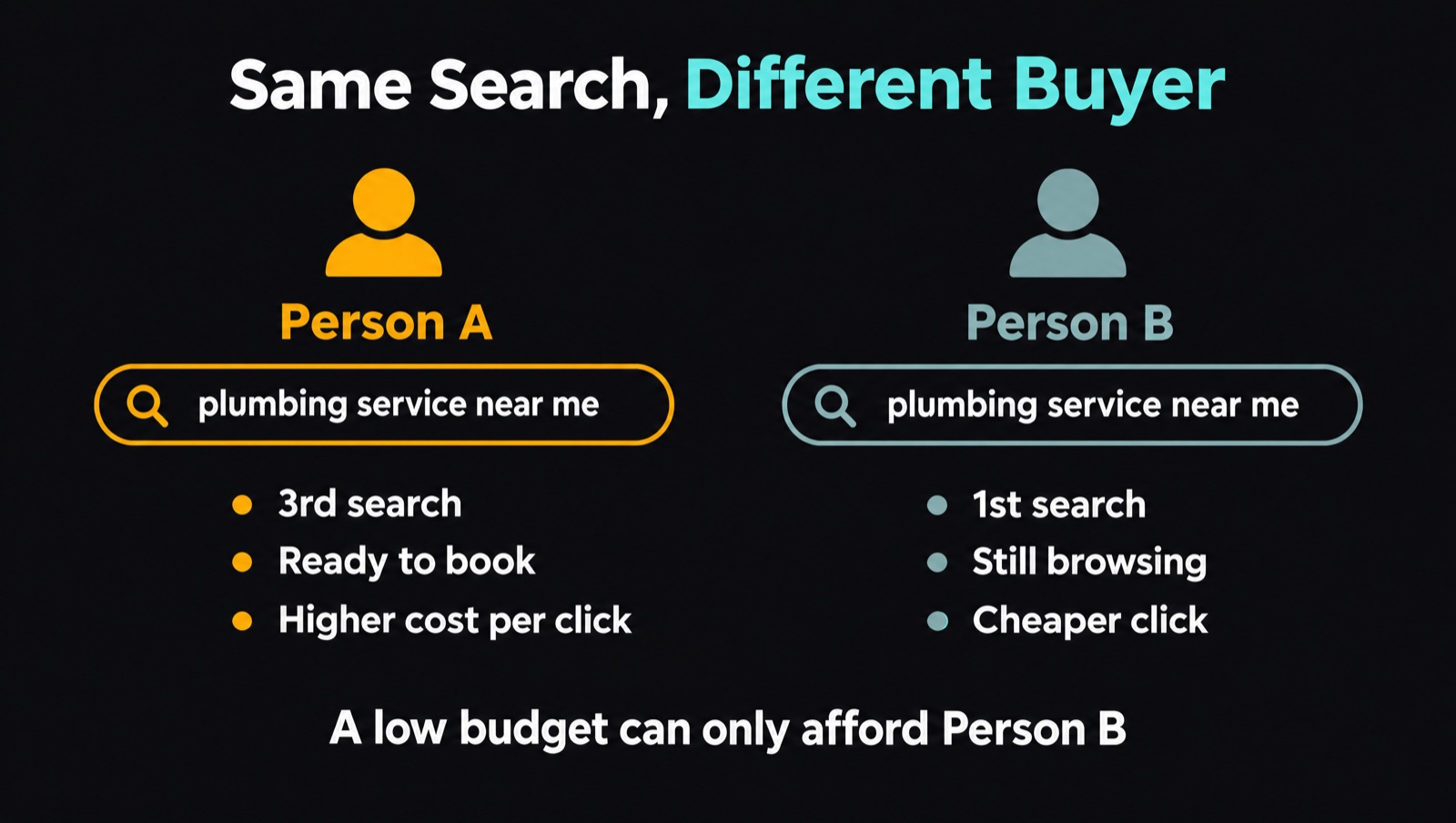
This is why underbidding is so hard to spot. Your search terms look clean because the searches themselves are relevant, but your conversions are terrible because you're buying the people who aren't ready yet.
To check this, open Keyword Planner and look up your top keyword. You'll see a "top of page bid (low range)" and a "top of page bid (high range)". If your cost per click is sitting near the low end, you're probably buying Person B. You want to be paying around 70 to 80% of the high range figure.
Case study: how a pest control company cut cost per lead from $700 to $100
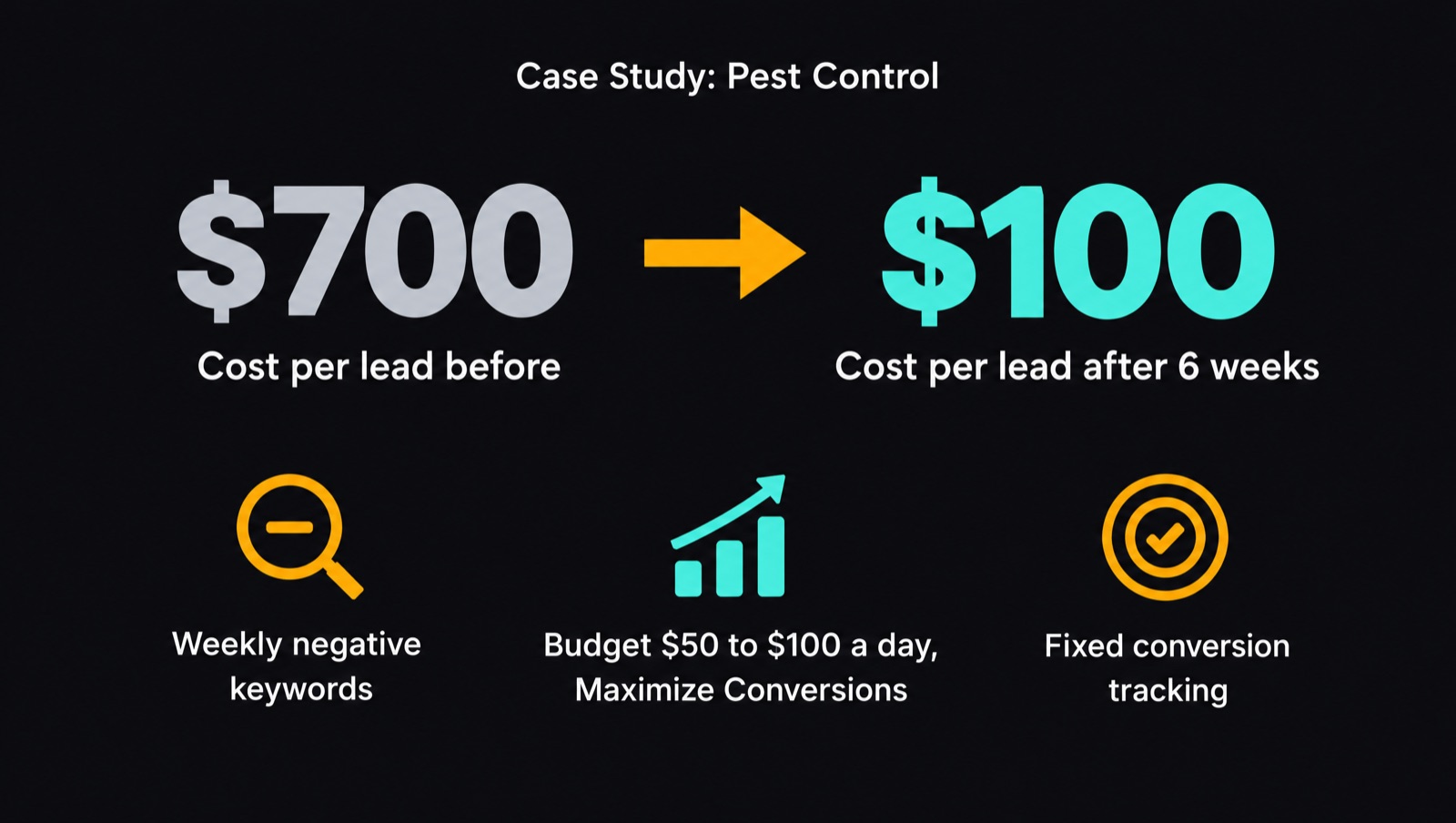
A pest control business came to us with a cost per lead of around $700. When we opened the account, all three problems were there.
What we found
- Underbidding. The campaign was on a Maximize Clicks bid strategy with a $50 daily budget. The going rate for his keywords was about $16 a click, and he was paying around $9. He was buying Person B clicks.
- Irrelevant search terms. His search terms were full of DIY and product searches, from people looking for sprays and treatments they could buy and use themselves. He's a service provider, so those clicks were never going to become jobs.
- Broken conversion tracking. His forms weren't capturing the GCLID or keyword data, so there was no way to match a lead back to the search that produced it. We couldn't tell whether the leads Google reported were qualified, or even legitimate.
What we changed
- We added negative keywords from the search terms report every week to cut out the DIY and product traffic.
- We raised the daily budget from $50 to $100 and moved the bid strategy from Maximize Clicks to Maximize Conversions. Competition for these clicks was strong, and he needed to be in the auction for the buyers who were ready to book.
- We fixed the conversion tracking so every lead carried its click and keyword data. This means we can see which keywords bring in qualified leads and which ones only look good in the dashboard.
The result
Within about six weeks, his cost per lead dropped from $700 to $100. He doubled his budget, and each lead now costs one seventh of what it did. The extra spend only paid off because the traffic was clean and the tracking was telling Google what a good lead looks like.
Why I don't recommend broad match and smart bidding in smaller markets
Google reps regularly push broad match keywords combined with smart bidding. My advice is quite different from theirs, and this is one of the biggest differences.
I don't believe broad match with smart bidding works in countries with smaller populations like Australia and New Zealand, or in a lot of the UK. In a very dense market like New York, it can work, but mostly because there are so many people searching with the intent to buy that a loose setup still catches enough of them. That's a volume win more than a strategic one.
In a smaller market there just aren't as many buyers searching on any given day. Broad match goes looking for more traffic and finds loosely related searches, and every one of those clicks takes a bigger share of a smaller budget.
What we do instead:
- Use tighter match types and move repeat offenders from phrase to exact match
- Audit search terms weekly and add negatives as we go
- Bid at the level the competition needs, so we're buying Person A and not just Person B
- Make sure tracking counts leads and not page activity, so smart bidding learns from the right signal
A 30 minute check you can run on your own account
If you don't have an agency, or you want to check whether yours is doing the basics, here's what I'd look at.
Check your search terms
Open the search terms report and look at how much of your spend went to searches that have nothing to do with your business.
- Under 10% of spend on irrelevant terms is normal. Keep adding negatives as you find them.
- Over 10% is a concern. Check the report regularly and keep cleaning it up.
- Over 40 to 50% means the problem is in your keywords. Edit the columns and add the "Keyword" column, which shows you the keyword that triggered each search term. If one keyword keeps showing up next to bad searches, tighten its match type (for example from phrase to exact) or remove it altogether.
Your traffic should get cleaner week after week. If you're adding negatives and the search terms aren't improving, the keywords themselves need work.
Compare Google's conversions with your CRM
This is the simplest way to tell if your tracking is broken. Look at how many conversions Google Ads reports for a period, then look at how many leads came in through your CRM or email over the same time.
- If the numbers match and Google Ads is your only source of leads, your tracking is probably fine.
- If Google says 20 leads and you only have 10, your tracking is broken.
- If Google says 20 and you have 20, but you also get leads from referrals, word of mouth, organic search, Facebook or LinkedIn, that's also a red flag. Google is claiming leads that came from somewhere else.
If you have Google Tag Manager installed, you can run a preview session and use the debugger to see which tags fire on which actions. It gets technical fast, and you need to know what you're looking for to tell whether something is broken. If you're not sure, our $99 Google Ads audit will check your tracking for you.
Check your bids against Keyword Planner
Look up your top keyword in Keyword Planner and compare your average cost per click with the top of page bid range. If you're near the low end, or getting fewer than 7 to 10 clicks a day, you're likely buying the cheapest and least ready buyers.
Work out your break-even cost per lead
Conversion rates and cost per lead depend heavily on what you sell and how much a job is worth. As a rough guide, emergency services often convert at 10 to 30%, and most other service campaigns should convert at 5% or higher. Cost per lead is harder to benchmark because it depends on your cost per click, your competition, your offer and plenty more.
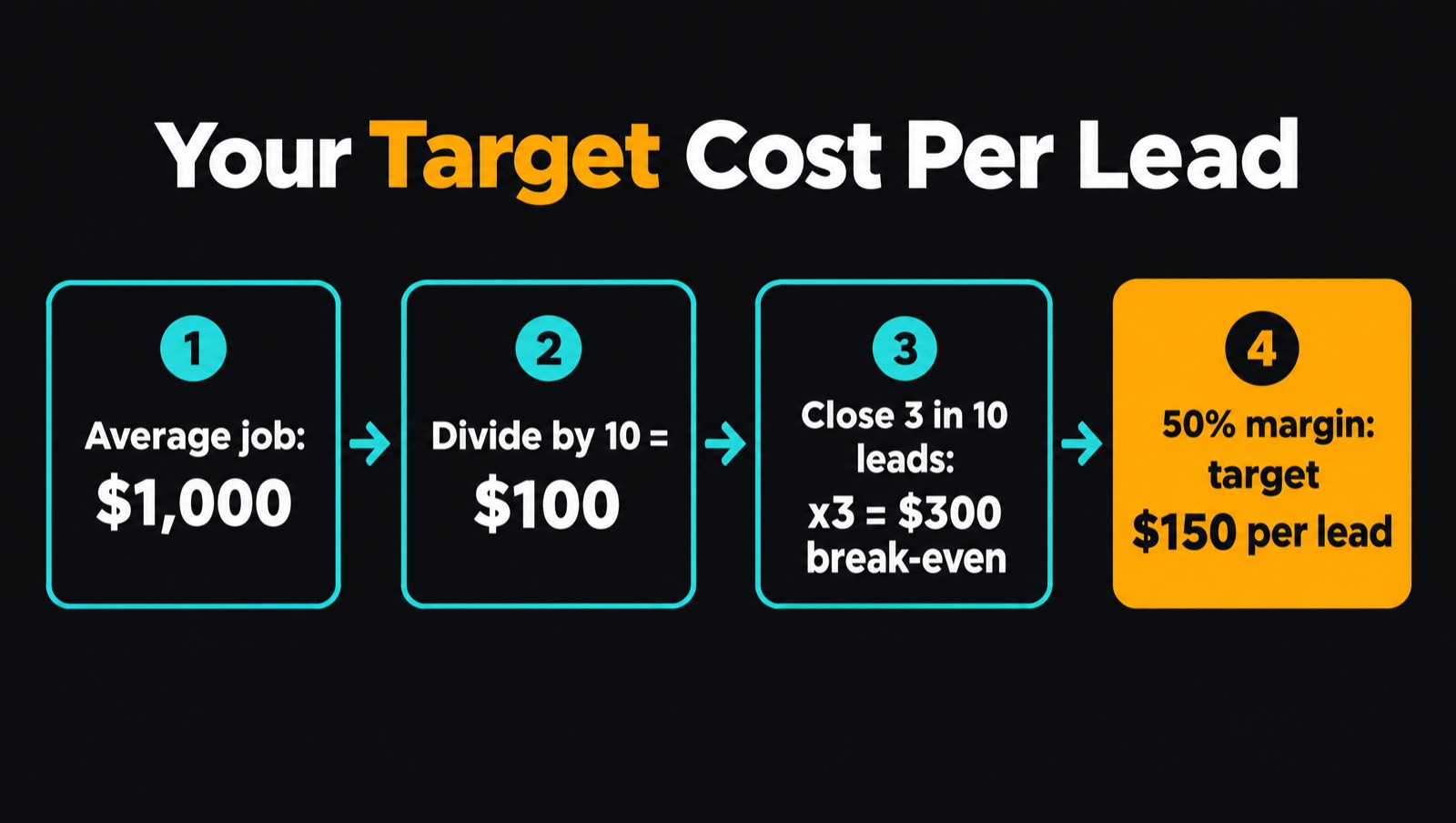
The number that matters most is the cost per lead that's profitable for you. Here's how to work it out:
- Take your average order value and divide it by 10.
- Multiply that by the number of leads you close out of every 10.
- That's your break-even cost per lead based on revenue.
- Now apply your margin. Multiply the break-even figure by your gross margin to get the number you should be working towards.
For example, if your average job is $1,000 and you close 3 out of every 10 leads, your break-even cost per lead is $300. If your margin is 50%, the number you should be working towards is $150.
Give changes the right amount of time
Review your account week to week, but know that different changes take different amounts of time to show up.
- Negative keywords take effect straight away. You should see the difference within a week, often the next day.
- Bid strategy changes, like moving from Maximize Clicks to Maximize Conversions, take 2 to 4 weeks before the numbers settle.
- Bigger structural changes should show results within 14 to 30 days.
I wouldn't wait more than a month. If you're more than a month past a change and things still aren't moving the way you expected, the change hasn't worked and something else needs looking at.
When the problem isn't your Google Ads account
Before any agency blames your landing page, they should be able to show you clean traffic, accurate tracking and bids that match the competition. Once those three are sorted and conversions still aren't coming, these are the next things I look at.
Does your landing page match the ad and the search?
The person who clicks your ad arrives with an expectation based on what they searched and what your ad said. If they searched for an urgent repair and land on a general services page, or your ad promised a free quote and the page doesn't mention it, they leave.
Check that your landing page message lines up with your ads and your search terms. If your ads lead with a free quote, the page should too. If your ads speak to a specific problem, the page should open with that problem.
Is your offer attracting the wrong people?
The right offer depends on your industry and the type of customer you're talking to.
A lawyer offering a free consultation will attract a lot of people who just want free advice, because of the nature of the service. You can still offer a free consult, but you need to be careful with it.
A plumber offering a free on-site check is different. The customer expects that if the job needs doing, the plumber is there and can quote on the spot, so the plumber is far more likely to win the job.
Look at who your offer brings in. If it attracts people who want something for free, change the offer or how you frame it.
Are you getting price shoppers?
If you're getting a lot of tyre kickers who click your ad, ask for a price and disappear once they hear it, put your price in the ad. Pin it as headline 2 so it shows every time. Some examples:
- "Initial Consults From $400"
- "Flat $150 Call-Out Fee"
- "Repairs From $X"
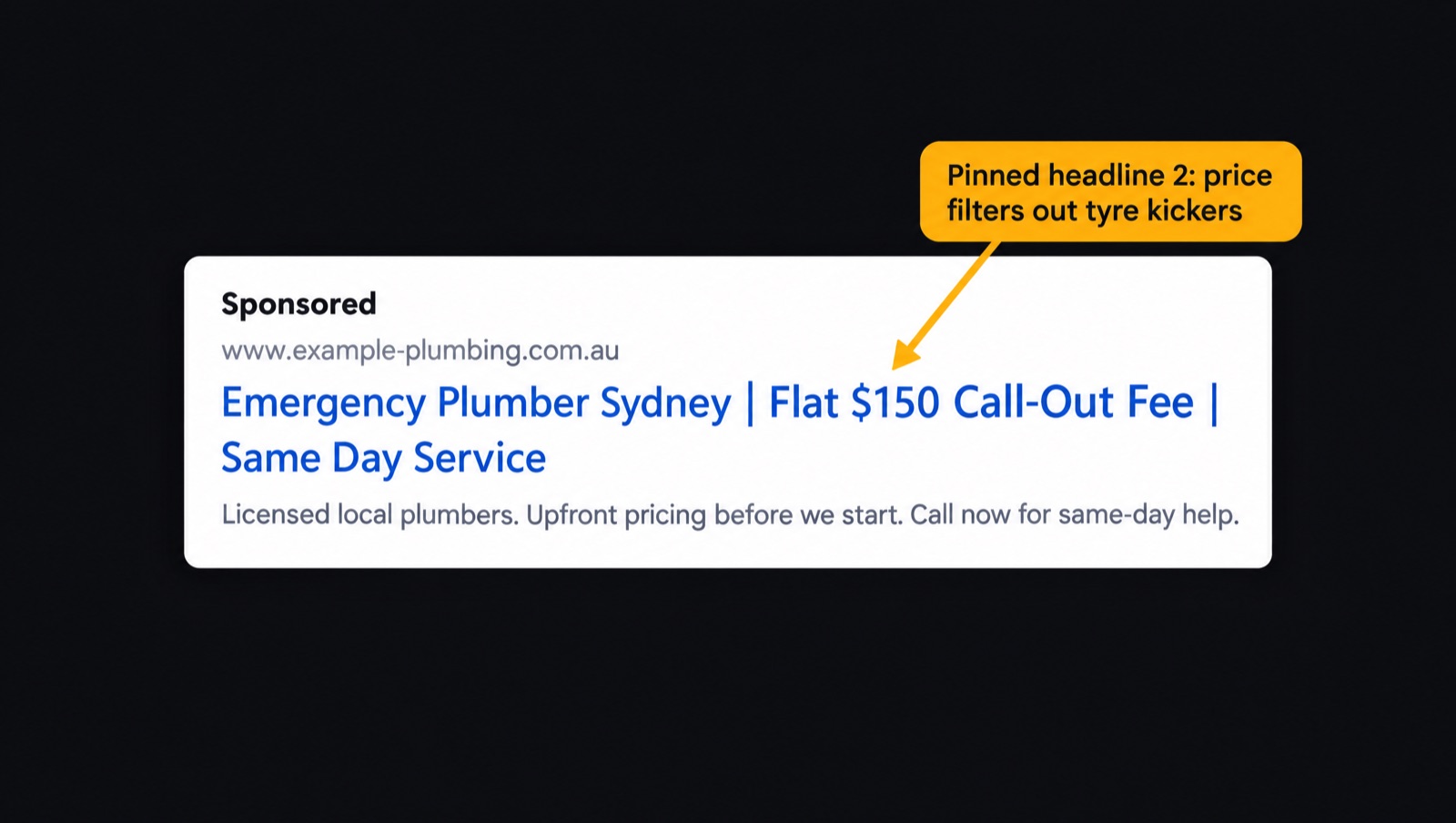
People who can't afford you see the price before they click, and you stop paying for clicks from people who were always going to say no.
Are you following up on your leads?
People who find you through Google Ads are cold prospects. They don't know you yet, and they need some trust before they hand over money. If you expect them to fill out a form and then come to you ready to pay, Google Ads will be hard work.
Once the ad gets the click and the lead comes in, the rest is up to you. Call back quickly, answer the phone, follow up on forms and let the customer know they're in the right place.
Fix the account before you blame anything else
Most Google Ads accounts that aren't converting have the same problems: irrelevant search terms, tracking that counts the wrong things, and bids too low to reach buyers who are ready. Fix those first. Then look at your landing page, your offer and how you handle leads.
Run through the 30 minute check above and you'll have a good idea of where your account stands. Weekly search term audits, accurate tracking and competitive bidding are the core of our Google Ads management for Australian businesses, and you can see more of how we work at Senior Ad Managers. If you'd like a second set of eyes, especially on your conversion tracking, our $99 audit will tell you exactly what's working and what needs fixing.
FAQ
The three most common causes are irrelevant search terms, conversion tracking that counts the wrong things, and a budget too low to reach buyers who are ready. Check your search terms report, compare Google's conversions with your CRM, and check your cost per click against Keyword Planner.
Every week at a minimum. Under 10% of spend on irrelevant searches is normal. Over 10% needs regular cleanup, and over 40 to 50% means the keywords themselves need fixing.
Compare the conversions Google Ads reports with the leads in your CRM or inbox for the same period. If Google reports more leads than you have, or claims every lead when you also get referrals, organic and social leads, the tracking is broken.
At least 7 to 10 clicks a day. Below that you can usually only afford the cheapest clicks, which tend to come from people who aren't ready to buy.
In my experience it doesn't work well in smaller markets like Australia, New Zealand and much of the UK. There aren't enough ready buyers searching each day, so broad match spends a bigger share of a smaller budget on loosely related searches.
Negative keywords work straight away, so expect to see a difference within a week. Bid strategy changes take 2 to 4 weeks. If nothing has moved after a month, the change hasn't worked.
Keep reading
How we can help
Next step
Find out where your ad spend is going.
Get a $99 AUD Google Ads audit. We'll show you where money is being wasted and which leads you're missing out on.
Show me my current ad mistakes →